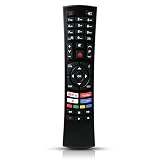
Replacement Remote with Voice for FireStick/Cube,AMZ Smart TVs | TV Remote Replacement for Insignia TVs Stick 4K/Max,Voice Remote for TV Stick Lite/HD,Insignia-Toshiba-Pioneer FireSeries TVs

Current price
£4.99
Retrieved on 27/11/2026 · prices subject to change
In stock
Product features
- Applicable Models: ILEBYGO Replacement remote for TV Stick 4K Max (1st Gen/ 2nd Gen), TV Stick 4K (1st Gen/ 2nd Gen), TV Stick (2nd Gen/ 3rd Gen), TV Stick Lite/ HD, TV Cube (1st /2nd /3rd Gen), Smart TVs (3rd Gen), remote compatible with Hisense/TCL/Insignia fire smart tvs that support voice commands
- Customizable Buttons: This tv stick remote replacement control includes 4 shortcut buttons and 2 customizable buttons, You can assign channels and applications to the two customised buttons for quick access to content
- ILEBYGO Remote With Voice: Replacement fire remote with voice search function, preset 4 app button shortcuts, quick access to your favorite content, you can use the voice function to find your favorite content and control content, control compatible smart home devices
- How to Pair: First you need to remove tv stick from TV and power from tv stick. Then reattach power and tv stick back in TV. Then Press the Home button about 10-15 seconds until the LED indicator starts to rapidly flash amber for 10 seconds, then your remote will automatically pair with your devices
- Attention: 1: Make sure your old remote's batteries are removed before pair, if the old stickw remote is still pairing, the new one can not be used, 2: If your product doesn't work, please send your message to us, we must give you the best solution in the end
Specifications
- Type
- Electronics
- Warranty
- 1
-
Amazon Made Fire TV Alexa Voice Remote Pro with remote finder, TV controls and backlit buttons (compatible Fire TV device required)
£19.24
View on Amazon£34.9927/11/2026 -
1Pcs Projector Remote Control Compatible with HY300 HY32 | Universal Remote Compatible with HY300 HY320 HY300Pro HD Portable Projector Replacement
£4.19 27/11/2026
View on Amazon -
Fire TV Alexa Voice Remote, requires compatible Fire TV Omni QLED Series, Fire TV 2-Series or Fire TV 4-Series smart TV
£29.99 27/11/2026
View on Amazon -
Apple TV Siri Remote (4th generation) | Find My support, Touch-enabled clickpad, Siri button, USB-C port
£59.00 27/11/2026
View on Amazon -
Bush TV Remote Control – Replacement Remote for Bush/Vestel/Nordmende/Salora Smart TV LED LCD HDTV - No Setup Needed, Plug & Play
£6.99 27/11/2026
View on Amazon -
ORIGINAL REMOTE CONTROL for EE - EE PRO REMOTE - EE TV Box Pro Bluetooth Voice Remote Control
£14.93 27/11/2026
View on Amazon -
Remote Control for Panasonic TV, Universal Panasonic TV Remote for All HD LCD LED Plasma Viera Smart TV with 3 Shortcut Buttons,No Setup Required
£5.94
View on Amazon£6.9927/11/2026